
When you’re running a Vision LLM on an AMD© Versal™ AI Gen 2, the real magic happens in how the chip moves data around. It’s not just about raw math speed; it’s about making sure the processors aren’t sitting idle waiting for information.
The Role of the AIE-ML Gen 2 Tile
Think of the AIE-ML Gen 2 tile as a high-speed worker. The 512-bit Vector Unit is the heavy lifter. It handles the “Matrix Multiply” operations that make up 90% of an AI model. In Gen 2, this unit got a major boost by supporting MX6 and MX9 formats. These are just smarter ways to represent numbers so you get high accuracy without the massive power drain of traditional floating-point math.
But a fast worker is useless without materials. That’s why each tile has 64KB of local memory. It acts as a private workbench. If the data is on that workbench, the processor can grab it instantly.
The Hardware Layout
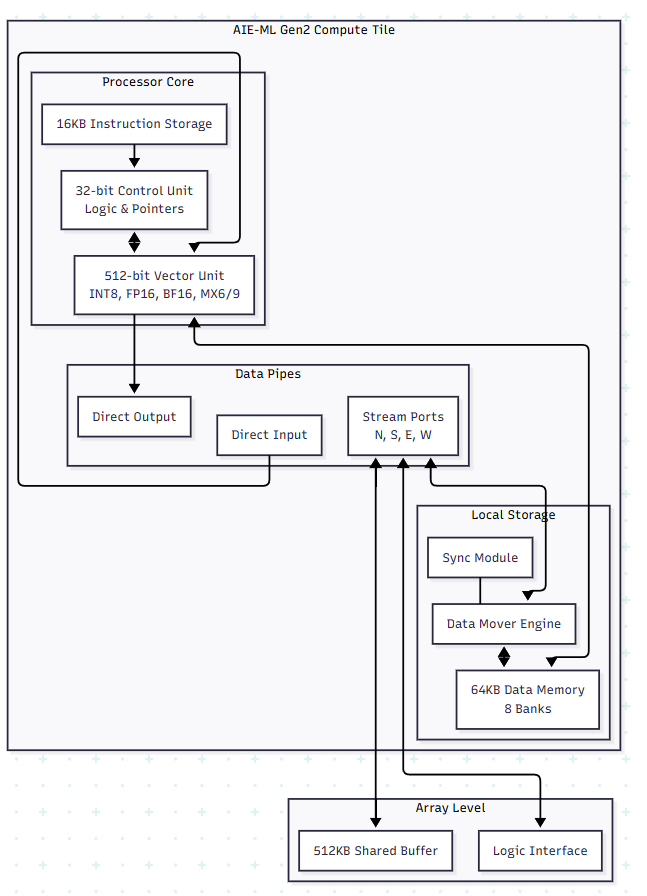
How Memory Tiles Solve the KV-Cache Problem
If you’ve worked with LLMs, you know they get slower as the conversation lengthens. That’s because the model has to remember everything it just said, that’s the KV-cache (Key-Value cache).
In most chips, this cache is stored in the main DDR memory. Every time the model generates a new word, it has to go out to the DDR, grab the cache, and bring it back. This “round trip” is a huge bottleneck.
The Versal Gen 2 fix:
It uses Memory Tiles. These aren’t compute tiles; they’re just massive blocks of 512KB SRAM that sit right next to the compute engines.
- Staging Area: The Memory Tiles act as a high-speed staging area for the KV-cache. Instead of going all the way to the slow DDR, the compute tiles just reach over to the Memory Tile next door.
- Multicast Data: If you have 10 compute tiles all needing the same piece of the KV-cache, the Memory Tile can “multicast” it to all of them at once through the AXI-Stream interface.
- Ping-Pong Buffering: While the compute tile is working on one part of the cache, the Tile DMA is already moving the next part from the Memory Tile. By the time the processor is done, the next piece of data is already sitting in its local 64KB memory.
The Result for Vision LLMs
For a model like Qwen2-VL, the vision part (the Encoder) uses the Cascade Streams to pass image data from tile to tile like an assembly line. Then, the language part (the Decoder) uses the Memory Tiles to keep the KV-cache close to the chest.
By keeping the data on-chip as much as possible, you stop wasting time and power moving bits back and forth to the RAM. That’s how you get a model that “thinks” fast enough to be useful in the real world.
How the Vitis compiler handle Vison LLM
When you hand a Vision LLM over to the Vitis AI Compiler, it doesn’t just see one big model. It sees a giant puzzle that needs to be broken into pieces. The compiler’s job is to “partition” the model, deciding which parts go to the AIE-ML tiles, which go to the Memory Tiles, and which (if any) stay on the ARM CPU.
Here is how the compiler actually maps a model like Qwen2-VL onto that grid of tiles.
1. Breaking the Model into “Kernels”.
The compiler takes your model and chops it into small functional blocks called kernels.
- Vision Encoder: These are usually convolutions or “windowed” attention. The compiler maps these to a string of AIE-ML tiles. It uses the Cascade Streams so that the output of one tile flows directly into the next without ever hitting the main memory. It’s like an assembly line for pixels.
- LLM Decoder: These are dense matrix multiplications. The compiler assigns these to “clusters” of tiles that work in parallel to handle the massive math.
2. Planning the “Data Move” (The Memory Tile Strategy)
This is where the compiler gets smart about that KV-cache we talked about.
- Buffer Allocation: The compiler looks at the size of your KV-cache and carves out space in the 512KB Memory Tiles. It sets up “ping-pong” buffers. While Tile A is crunching on one set of data, the Tile DMA is already moving the next chunk of the cache into the Memory Tile from the DDR.
- Tiling: If a layer is too big for one tile’s 64KB memory, the compiler “tiles” the operation. It breaks the math into 32×32 or 64×64 blocks that fit perfectly on the local workbench.
3. Routing the Traffic
The compiler acts like a GPS for your data. It has to figure out the AXI-Stream paths between tiles.
- It avoids “congestion” by making sure two different data streams aren’t trying to use the same physical wire at the same time.
- It schedules exactly when the Lock Module should trigger. This ensures a tile doesn’t start math until the data it needs has actually arrived from the Memory Tile.
4. Generating the Microcode
Once the map is finished, the compiler generates a specialized instruction stream (microcode).
- AIE-ML Binaries: These tell the vector units exactly what math to do.
- Control Code: This runs on the Scalar RISC processor inside each tile to manage the pointers and loops.
- XCLBIN: Everything is wrapped into one file that the XRT (Xilinx Runtime) loads onto the chip at runtime.
Why is this a “Black Box” for you
The best part is that you don’t have to write the code for each tile yourself. You give the compiler your PyTorch or ONNX model, and it does the math to figure out the most efficient way to spread it across the hardware. It’s the difference between building a car part-by-part and just telling the factory which model you want.